mcp-azure
TypeScriptMCP server for Azure (Resource Manager) — inventory, tags, VM power, lifecycle — with governance controls (scoping, protected groups, location allowlist, delete gating, confirmation).
npx -y @dockndevai/mcp-azureTwenty open-source Model Context Protocol servers that let AI agents work with real systems — infrastructure, cloud, databases, Microsoft 365, your Mac, and your own documents — without being handed the keys. Read-only by default, least privilege, secrets never leak.
Each runs over stdio and installs with a single npx command (requires Node 22+). All share one governance model; full per-client setup lives in every repo's docs/CLIENTS.md. Jump to any product from the Products menu above.
MCP server for Azure (Resource Manager) — inventory, tags, VM power, lifecycle — with governance controls (scoping, protected groups, location allowlist, delete gating, confirmation).
npx -y @dockndevai/mcp-azureMCP server for Azure DevOps — boards, repos, pipelines, projects — with governance controls (access modes, project scoping, protected projects, delete gating, typed confirmation).
npx -y @dockndevai/mcp-azure-devopsMCP server for Kubernetes — multi-cluster ops with security modes (read-only/read-write/admin) and access-control flags.
npx -y @dockndevai/mcp-kubernetesMCP server for Debezium / Kafka Connect — monitor & manage CDC connectors with security modes and access-control flags.
npx -y @dockndevai/mcp-debeziumMCP server for ClickHouse — explore, query, and manage with SQL-classification-based security modes and access-control flags.
npx -y @dockndevai/mcp-clickhouseMCP server for Apache Kafka — monitor & manage clusters, topics, and consumer groups (with lag), with security modes and access-control flags.
npx -y @dockndevai/mcp-kafkaMCP server for Keycloak — multi-realm admin with security modes (read-only/read-write/admin) and access-control flags.
npx -y @dockndevai/mcp-keycloakMCP server for the Percona Operator for PostgreSQL — manage PostgreSQL + PgBouncer, pooling, backups/PITR, and DR with safe-by-default security flags.
npx -y @dockndevai/mcp-percona-pgMCP server for Oracle Cloud (OCI) — live resource discovery, dependency mapping, and Terraform generation, with security modes and access-control flags.
npx -y @dockndevai/mcp-ociMCP server for Grafana — search & edit dashboards, query datasources (Prometheus/Loki/SQL), inspect alerts, with safe-by-default access modes.
npx -y @dockndevai/mcp-grafanaSafe-by-default MCP server for Microsoft Outlook mail (Microsoft Graph) — read, search, draft, send, reply, forward and organize email, with browser sign-in.
npx -y @dockndevai/mcp-outlookMCP server for Ossian — ask your own documents with citations, and give an agent memory that persists
npx -y ossian-mcpFull macOS control MCP server — drive a Mac like a human: shell, AppleScript, files, processes, and human-like GUI (click, drag, scroll, type). Full control by default; opt-in safe mode.
npx -y @dockndevai/mcp-mac-controlSafe-by-default MCP server to observe & operate a Mac — files, processes, apps, shell, AppleScript, GUI.
npx -y @dockndevai/mcp-macosSafe-by-default MCP server for OpenShift / Kubernetes — projects, pods, logs, deployments, routes and more, with username/password (local IdP) or token auth.
npx -y @dockndevai/mcp-openshiftnpx -y @dockndevai/mcp-cdpSafe-by-default MCP server for Microsoft Teams (Microsoft Graph) — read teams, channels, chats and messages, and post/reply/send, with browser sign-in.
npx -y @dockndevai/mcp-teamsMCP server to control an Android device over ADB — screenshots, taps, typing, app launch, alarms, notifications — safe-by-default with access modes and gated destructive ops.
npx -y @dockndevai/mcp-androidShared safe-by-default governance library for the dockndevai MCP server suite: capability/mode gating, resource allowlist + protected resources + opt-in flags, human-in-the-loop elicitation, symlink-safe path canonicalization, audit, and a buildServer + create-mcp-server scaffold.
npx -y @dockndevai/mcp-coreMCP server to drive a physical iPhone/iPad over Appium + WebDriverAgent (XCUITest) — safe-by-default with access modes and gated destructive ops.
npx -y @dockndevai/mcp-iosFor any Chromium-based app there's a better way to let agents test their own changes than computer-use — attach to the app's DevTools instead of driving pixels. mcp-cdp is that tool.
Start each agent in its own git worktree, run its own dev build with an explicit --remote-debugging-port, and attach mcp-cdp to that port. Each agent controls only its own app — no two agents fight over one desktop.
Over the Chrome DevTools Protocol the agent reads the real DOM (not a screenshot), and sees what isn't on screen — console errors and failed requests. When a test fails, the reason is right there.
CDP works the same on macOS, Linux and Windows — including a headless VPS in the cloud, where OS-specific computer-use can't go. Same flow, any environment.
your-electron-app --remote-debugging-port=9222 && npx -y @dockndevai/mcp-cdpSafe by default: read-only until you raise the mode, a target allowlist, sign-in pages and browser internals are inspect-only, arbitrary JS is gated behind an explicit flag, and the endpoint is loopback-only. See the mcp-cdp card and the bundled cdp-safe-operations skill.
Every server shares a pure, unit-tested policy engine. Over-privileged tools are never even advertised to the model; each call is re-checked at runtime.
Servers start in read-only mode. Write and admin tools aren't registered until you raise the access mode deliberately.
Scope to specific namespaces, databases, projects or subscriptions. Protected resources can be read but never mutated.
Destructive operations need the admin mode and an explicit opt-in flag — the most dangerous aren't registered without it.
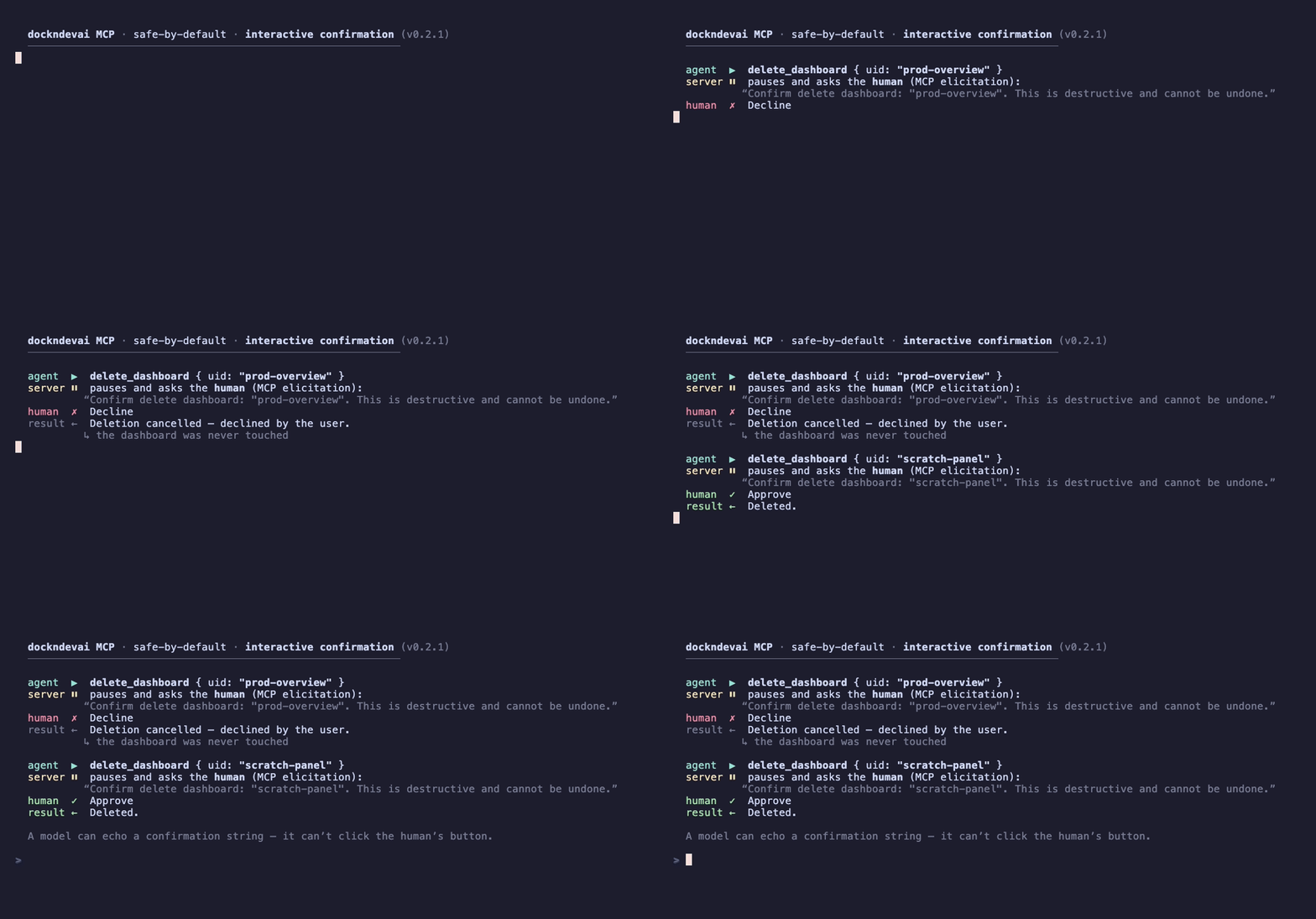
Destructive & high-impact actions pause and ask the person to approve — live, via MCP elicitation — before they run. A model can't approve on your behalf.
Validate and log write intent without executing it — preview exactly what an agent would change.
Every guarded operation emits a structured audit line to stderr. Secrets are redacted from all output.
laya-guard classifies high-risk commands (shell, JS eval, apply/delete/exec) allow / confirm / block with a local decision model before they run. Defence in depth that only ever tightens, never grants; fails closed; fully on-device. Wired into every mutating server in the suite (15 servers) — off by default, enabled per-server with one flag.
The MCP servers are adapters. These are the real platforms I build and run underneath.
Open-book RAG over your own documents — Spring Boot + Spring AI, a React console, Keycloak OAuth2, Postgres/pgvector and Redis. Answers with citations, plus a maintenance side for ingestion, re-indexing and coverage gaps. ossian-mcp is its agent adapter.
An LLM gateway on Spring Cloud Gateway (WebFlux): virtual keys, token quotas, usage metering and failover for self-hosted OpenAI-compatible backends (vLLM, Ollama).
A realtime, voice-driven assistant with Claude as the brain: local Whisper STT, streaming TTS with barge-in, subagents, and a web dashboard.
The site for Otto — the realtime voice assistant.
A brew tap to install Otto.
brew install dockndevai/otto/ottoEvery claim measured, every failure documented. Most pair with an MCP server above.
PostgreSQL + PgBouncer on Kubernetes with the Percona Operator — HA, DR, connection pooling, backups, observability. Pairs with mcp-percona-pg.
Operating Apache Kafka on Kubernetes with Strimzi — provision, upgrade, DR with MirrorMaker 2, and read-only agent triage. Pairs with mcp-kafka.
A macOS game and real screensaver: the camera turns people into cartoon characters and a local decision model (Laya) directs harmless toy chaos at them — ~340 ms per decision on an M2 Pro. Body rectangles only, no face recognition, nothing recorded or uploaded. Documents what macOS refuses: a screensaver can never get camera access, so a launchd helper owns the camera and publishes anonymous boxes over localhost.
Every server is a standard stdio MCP server on npm. Here it is in Claude Code — start in read-only and raise the mode when you need to.
# Claude Code — mcp-kubernetes, read-only
claude mcp add kubernetes \
  -e K8S_MODE="read-only" \
  -- npx -y @dockndevai/mcp-kubernetes

# Or wire any server into claude_desktop_config.json:
{
  "mcpServers": {
    "kubernetes": {
      "command": "npx",
      "args": ["-y", "@dockndevai/mcp-kubernetes"],
      "env": { "K8S_MODE": "read-only" }
    }
  }
}npx command.read-write, then admin plus an opt-in flag for anything destructive.docs/CLIENTS.md.The suite is built in the open and promoted across the developer community — code, packages, writing, and discussion.